

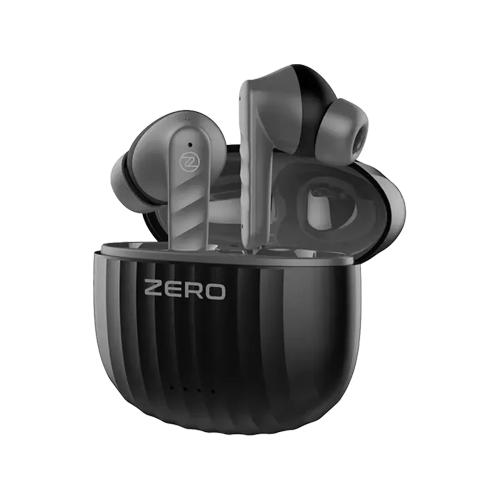
Most Zero earbuds pair the same way: open the case near your phone, then pick the earbuds from the Bluetooth list. If one bud stops working, forget the earbuds on your phone, put both buds back in the case, reset them and pair again. Zero publishes exact reset steps for only some models, so below we show the official steps where they exist and clearly mark the general steps everywhere else.
Your model name is on the box and in your phone’s Bluetooth list. See every model we sell in our Zero earbuds range.
Quick answers by model
| Model | Reset (official) | ANC? | Gaming mode |
|---|---|---|---|
| Zero Carbon | Hold both earbuds for 10 seconds | No (ENC for calls only) | Tap 4 times |
| Zero Nexus Pro Zbuds | Take buds out, tap either bud 4 times | Yes, feed-forward ANC + transparency | Triple tap right |
| Zero Wave ANC Zbuds | Not published by Zero | Yes, ANC + transparency | Tap either bud 4 times |
| Zero Quantum | Not published by Zero | Yes, ANC | Low-latency mode, steps not published |
| Zero Wave Pro | Not published by Zero | No (ENC for calls only) | Tap 4 times |
| Zero Gravity | Not published by Zero | No (ENC for calls only) | None listed |
Where it says “not published”, use the general steps below and the manual in the box.
How to connect Zero earbuds the first time
Zero says its earbuds pair automatically when you take them out of the case (it calls this instant pairing, Insta-Pair or Blink to Pair depending on the model). In practice:
- Charge the case for a while if the earbuds are new. A flat battery is the most common reason they “won’t connect”.
- Turn on Bluetooth on your phone.
- Open the case and take both earbuds out. The two buds connect to each other first.
- On your phone, go to Bluetooth and tap the Zero name when it shows up (for example “Zero Carbon” or the model name on your box).
- Once connected, the earbuds will reconnect to this phone on their own the next time you open the case.
The Zero Wave Pro works the same way: Zero says it connects to your device instantly.
Pairing Zero earbuds with a second phone
General steps (not from Zero): earbuds usually connect to the last phone they used. To move them to another phone, turn Bluetooth off on the first phone (or “forget” the earbuds there), then open the case near the second phone and pick them from its Bluetooth list. Zero does not list multipoint (two phones at once) for the models in this post, so expect to switch between phones rather than use both together.
One Zero earbud not working or not connecting
If only one bud plays, the two buds have usually lost their link to each other. Try these in order:
- Put both buds in the case and check that each one shows it is charging. Wipe the metal charging points on the buds and inside the case with a dry cloth or cotton bud.
- On your phone, go to Bluetooth and “forget” or “unpair” every Zero entry. Sometimes you will see two, one for each bud. Remove both.
- Reset the earbuds (steps below for your model).
- Take both buds out together and pair again as if they were new.
Official reset steps
- Zero Carbon: Zero says to long press both earbuds for 10 seconds to factory reset.
- Zero Nexus Pro Zbuds: take the earbuds out of the case, then tap the left or right bud 4 times. Holding either bud for 5 seconds powers it off.
General reset steps for other Zero models
General steps (not from Zero): Zero does not publish reset steps for the Quantum, Wave Pro, Wave ANC or Gravity on its product pages. These steps work on most true wireless earbuds, but tap counts differ, so check the manual in the box first:
- Forget the earbuds in your phone’s Bluetooth settings.
- Put both buds back in the case for a few seconds, then take them out.
- Press and hold both buds together for about 10 seconds until the lights flash. Some pairs need 4 or 5 quick taps instead.
- Put them back in the case, close the lid, open it again and pair as new.
If one bud still stays silent after a reset and a full charge, it is probably a hardware fault. Message us on WhatsApp with your order number and a short video showing the problem, and we will help you with the next step.
How to turn on ANC on Zero earbuds
First check that your model actually has ANC. Many Zero earbuds have ENC, which cleans up your voice on calls but does not block noise for you. Going by Zero’s specs and our product pages:
- Zero Quantum (Rs 4,900
Rs 21,999
Sale): ANC plus quad mic ENC for calls. - Zero Wave ANC Zbuds (Rs 5,999
Rs 7,999
Sale): ANC, transparency mode and quad mic ENC. - Zero Nexus Pro Zbuds (Rs 5,999
Rs 8,999
Sale): feed-forward ANC and transparency mode. - No ANC: Carbon, Wave Pro, Gravity and Wave. These have ENC for calls only.
How to activate ANC on Zero Quantum earbuds
General steps (not from Zero): Zero lists ANC on the Quantum but does not say on its product page which tap switches it. On most ANC earbuds you press and hold one bud for about 2 to 3 seconds, or tap it a set number of times, to move between ANC, transparency and off. The exact gesture is in the Quantum manual in the box. If you have lost it, send us a WhatsApp message and we will check for you.
Wave ANC and Nexus Pro
On the Wave ANC Zbuds, Zero says to tap the right earbud 3 times to activate ENC for calls, triple-tap the left earbud for Siri or Google Assistant, and tap either bud 4 times to switch between game and music mode. On the Nexus Pro, triple tap the right bud for game mode and triple tap the left bud for your voice assistant. For both models, Zero does not publish the gesture that switches between ANC and transparency, so follow the general steps above and check the box manual.
Not sure if you need ANC at all? Our ANC vs ENC guide explains which one helps on a Pakistani commute.
Zero earbuds not charging
- Seat the buds properly. Zero says the earbuds charge automatically when you put them in the case. If they sit slightly off the pins, they won’t charge.
- Clean the contacts. Earwax and dust on the metal points are the usual cause of one bud not charging.
- Charge the case itself. Plug the case in with its cable and a normal phone charger and leave it for a while. Check that the case light comes on.
- Try another cable and adapter. A bad cable looks just like a dead battery.
- Still nothing? Contact us on WhatsApp with your order number. Zero asks for a clear video of the problem when you raise a complaint, so record one before you message.
Still stuck?
Bought your Zero earbuds from us? Message us on WhatsApp with the model name and the problem. Looking for a new pair? Browse the Zero earbuds range (cash on delivery all over Pakistan), see our best gaming earbuds list, or read the 10 best wireless earbuds in Pakistan.
Questions people ask
How to reset Zero Carbon earbuds?
Forget the earbuds in your phone’s Bluetooth settings, then long press both earbuds for 10 seconds. That is Zero’s official factory reset for the Carbon. Afterwards, put them in the case, open it again and pair as new.
How to activate ANC in Zero Quantum earbuds?
Zero confirms the Quantum has ANC but does not publish the exact gesture on its product page. On most ANC earbuds you hold one bud for 2 to 3 seconds or tap it a few times to cycle the modes. Check the manual in the box, or message us on WhatsApp and we will help.
How to connect Zero Wave Pro earbuds?
Turn on Bluetooth, open the case and take both buds out. Select the Wave Pro in your phone’s Bluetooth list. After that, they reconnect on their own whenever you open the case.
Why are my Zero earbuds not connecting?
Usually a flat battery, an old saved pairing, or the buds still linked to another phone. Charge the case, forget the earbuds on every phone, reset them and pair again.
One Zero earbud is not working. What should I do?
Clean the charging points, charge both buds in the case, forget all Zero entries in Bluetooth, reset and pair again. If one bud still stays silent, it may be a hardware fault, so contact us with a short video.
Do Zero Carbon earbuds have ANC?
No. The Carbon has quad mic ENC, which cleans up your voice on calls. For ANC, look at the Zero Quantum, Wave ANC Zbuds or Nexus Pro Zbuds.
What if my Zero earbuds still don’t work after a reset?
Zero earbuds bought from Mobile Geeks come with a 1 year warranty. Message us on WhatsApp with a short video of the problem and we will help you claim it.