


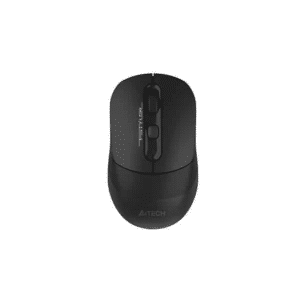
The A4Tech FB50CS Plus is a dual-mode wireless mouse built for people who work across more than one device. It pairs over Bluetooth or the bundled 2.4GHz nano receiver, switches between three connected devices at the push of a button, and keeps things quiet with silent-click buttons rated for 5 million presses. A built-in rechargeable battery and Type-C charging port mean you are not hunting for AA batteries every few months. This listing is for the Black variant.
Features

Dual Connectivity Mode (Bluetooth + 2.4GHz)
Pair the FB50CS Plus over Bluetooth for a receiver-free setup, or use the included 2.4GHz USB nano receiver when you need a stable, low-latency connection. Both modes work independently, so you can pick whichever suits the device you are on.
Switch Between Up to 3 Devices
Connect your laptop over 2.4GHz and two more devices over Bluetooth, then jump between all three using the switch button on the bottom of the mouse. It is handy if you move between a work laptop, a personal laptop, and a tablet through the day.


3200 DPI, 5-Level Adjustable Sensitivity
Cycle through five DPI presets, 1000, 1200, 1600, 2000, and 3200, using the S button on top of the mouse. Lower settings suit detailed document work, while 3200 DPI is fast enough for browsing through large spreadsheets or moving across multiple monitors.
Symmetric, Ambidextrous Shape
The body is shaped to sit comfortably in either hand, with a slightly raised palm rest and textured side grips that keep it from sliding around during long sessions.


Silent Buttons, Rated for 5 Million Clicks
The left and right buttons use a silent-click switch, so you can work in a quiet office, a shared room, or late at night without the usual mouse-click noise. A4Tech rates the switches for up to 5 million clicks, so they are built to last.
More Reasons to Like It

On/Off Power Switch
A physical switch on the underside lets you fully cut power when the mouse is not in use, which helps the battery hold its charge between sessions instead of draining in standby.

Rechargeable, Type-C Charging
Skip the AA batteries. The FB50CS Plus has a built-in rechargeable battery that charges through a Type-C port, with a full charge taking around two hours. A 60cm Type-C cable is included in the box.

16-in-1 Gesture Support
Install A4Tech’s free driver and assign gesture-based shortcuts, like copy, paste, switch windows, or open specific apps, to the side and function buttons through the included software.

Quiet in Any Room
No sharp clicking sound on the left or right buttons, which matters if you share a desk, work near a sleeping baby, or just prefer a quieter setup.

Built for the Long Run
A4Tech built these switches for roughly twice the operating life of a standard mouse button, so clicks stay crisp and accurate even after years of daily use.
Specs & Details
| Connection | Bluetooth / 2.4GHz, up to 3 devices (2x Bluetooth, 1x 2.4GHz) |
| Sensor Type | Optical |
| Operating Distance | 5 to 10 meters |
| Buttons | 7 |
| Report Rate | 125 Hz |
| DPI | 1000 / 1200 / 1600 / 2000 / 3200 (adjustable) |
| Battery | Built-in rechargeable lithium battery |
| Charging Time | Approx. 2 hours for a full charge |
| Charging Cable | Type-C, 60cm (included) |
| Dimensions | 120 (L) x 63 (W) x 36 (H) mm |
| Weight | 79 g |
| Compatible Systems | Windows, macOS, Chrome OS, Android |
| Color | Black |
| What’s in the Box | FB50CS Plus mouse, USB nano receiver, Type-C charging cable |
Downloads
Need the driver for the 16-in-1 gesture software, or the printed manual? Grab both directly from A4Tech’s official site:
Reviews
There are no reviews yet.